
AlienWare Red Theme for Windows
Overview
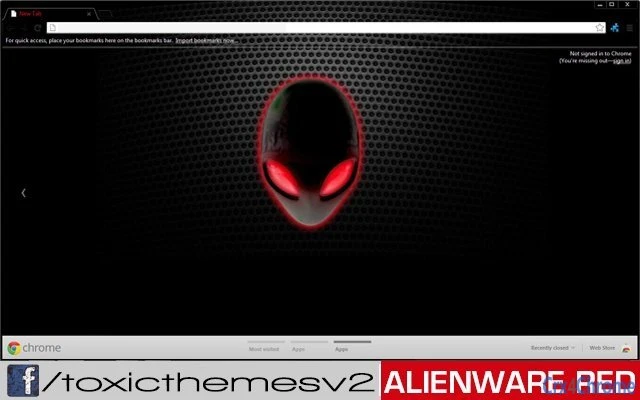
The AlienWare Red by toxicversion 1.0 is a desktop theme designed for users seeking a distinctive visual identity on Windows 10 and Windows 11 systems. Targeted primarily at gaming enthusiasts and personalization-focused users, this theme enhances the user interface with a bold, futuristic aesthetic inspired by the iconic Alienware brand. It transforms standard desktop elements—such as window borders, icons, and taskbar—into a cohesive, high-contrast red-themed environment, ideal for creating a dynamic and immersive computing atmosphere.
Designed for users who value visual customization, this theme appeals to those who want to personalize their workspace without altering core system functionality. It is particularly suited for gamers and tech enthusiasts who appreciate brand-aligned aesthetics and enjoy tailoring their digital experience. The theme does not include functional tools or utilities; its primary purpose is visual enhancement.
While the developer, toxicversion, has not provided detailed background information, the theme is part of a broader initiative to migrate toxicthemes to a new, user-friendly platform with improved navigation and customer support. This suggests a focus on community engagement and long-term user experience. The theme is available at no cost, making it accessible to a wide audience seeking aesthetic upgrades.
Key Features & Capabilities
- Futuristic Alienware-Inspired Design – Features a vibrant red color scheme that mirrors the aesthetic of Alienware’s high-end gaming systems, offering a visually striking desktop experience.
- Full Desktop Customization – Applies consistent visual changes across the operating system, including window frames, taskbar, icons, and start menu, ensuring a unified look.
- Compatibility with Windows 10 and Windows 11 – Designed to function on both major Windows platforms, allowing broad accessibility for users on modern systems.
- Lightweight Installation – At just 2.1 MB, the theme file is small and efficient, minimizing impact on system resources during installation and use.
- Easy Application Process – Users can apply the theme through standard Windows personalization settings, requiring no technical expertise.
These features allow users to quickly transform their desktop environment into a gaming-centric workspace. For example, a gamer might use this theme to align their PC’s visual style with their gaming hardware, creating a cohesive setup. Similarly, a designer or content creator may use it to experiment with color schemes and interface layouts without altering system performance.
User Interface, Workflow & Performance
The user interface of AlienWare Red is entirely dependent on the Windows personalization settings, as it is a visual theme rather than a standalone application. Users access it through the standard “Personalization” section in Settings, where they can select and apply the theme with minimal steps. The workflow is straightforward: download the file, extract it if necessary, and apply it via the system’s theme selector.
Since the theme does not include active components or background processes, it does not consume significant CPU or RAM resources. The developer did not specify resource usage details, but based on its 2.1 MB size and passive nature, it is expected to have negligible impact on system performance. Stability is not affected, as the theme modifies only visual elements and does not interfere with system operations.
Users can expect consistent behavior across sessions, with no reported issues related to crashes or conflicts. However, exact performance details were not specified by the developer. The theme remains fully functional after system restarts and does not require reapplication.
Compatibility & System Requirements
AlienWare Red by toxicversion 1.0 is compatible with Windows 10 and Windows 11, as confirmed by the developer. These are the only operating systems officially supported. The theme is not designed for older Windows versions or other platforms such as macOS or Linux.
The installation size is 2.1 MB, which is minimal and suitable for systems with limited storage. No additional software or dependencies are required to apply or use the theme. The developer did not provide specific hardware requirements, so users are advised to ensure their system meets the baseline requirements for Windows 10 or 11.
Compatibility information was partially provided. While the theme is confirmed to work on the listed systems, detailed specifications regarding graphics drivers or display resolution support were not included. Users should test the theme on their specific setup to verify visual alignment and appearance.
Pros and Cons
Pros
- Visually striking red theme inspired by Alienware gaming aesthetics
- Lightweight at only 2.1 MB
- Simple and intuitive application via Windows personalization settings
- Free to download and use
- Compatible with both Windows 10 and Windows 11
Cons
- No active functionality beyond visual customization
- Developer did not provide detailed system requirements
- Only available for Windows platforms
- No built-in update mechanism or automatic version checks
- Visual effects may not render consistently across all display configurations
FAQ Section
Is AlienWare Red compatible with Windows 10 and Windows 11?
Yes, the theme is officially supported on both Windows 10 and Windows 11.
Can I use this theme on macOS or Linux?
No, the theme is designed exclusively for Windows operating systems and is not compatible with macOS or Linux.
Is the theme safe to install?
Yes, the theme is a standard visual file and does not contain executable code or malware. It only modifies desktop appearance.
Do I need to pay to use this theme?
No, the theme is completely free to download and use.
How do I update the theme if a new version is released?
Updates are not automatically delivered. Users must manually check the developer’s official page for new releases.
Final Thoughts & CTA
AlienWare Red by toxicversion 1.0 delivers a bold, immersive visual experience tailored for gaming and customization enthusiasts. Its striking red design, lightweight footprint, and ease of use make it an excellent choice for users who want to enhance their desktop appearance without compromising performance. While it serves no functional purpose beyond aesthetics, it excels in its niche.
For gamers, content creators, and anyone passionate about personalizing their workspace, this theme offers a simple yet impactful upgrade. It is especially valuable for those who own Alienware-branded hardware or wish to emulate its signature look.
Download AlienWare Red now and transform your Windows desktop into a futuristic gaming command center.







